

A hospital bed remote, also known as a pendant or hand control, allows you to adjust the bed’s position for comfort, safety, and specific medical needs
. The buttons control the head, feet, and overall height of the bed.
Before you begin
- Locate the remote: The remote is typically attached to the side rail of the bed via a long cord.
- Identify the functions: Most remotes use arrow icons to indicate direction. Look for images showing a person sitting up, legs bent, or the entire bed moving up and down.
- Understand the controls:
- Head/Back up/down: Two buttons (often side-by-side) will control the head and back sections of the bed.
- Foot/Leg up/down: A separate set of buttons will control the leg and knee sections.
- Bed height up/down: Some models also have buttons to raise or lower the entire bed’s height.
How to use the remote
- Press and hold the button: To move a section of the bed, press and hold the appropriate button. The bed will move continuously as long as you hold the button.
- Release to stop: Release the button once the bed reaches the desired height or position.
- Adjust the head: To help a person sit up, press and hold the “head up” button. To lay them back down, use the “head down” button.
- Adjust the feet: To raise or lower the leg section, press and hold the corresponding “foot up” or “foot down” button. This can help with swelling or comfort.
- Adjust the overall height: If the bed has this feature, use the “bed height up” or “bed height down” buttons to move the entire bed closer or farther from the floor. This can be helpful for transfers or for caregivers.
Special features and considerations
- Lock feature: Some remotes can be locked to prevent accidental or unauthorized use. Look for a button with a padlock icon. Pressing it will disable the controls and prevent the bed’s position from being changed.
- CPR release: Hospital beds have a CPR release function to quickly and manually flatten the bed during an emergency, which is typically handled by medical staff.
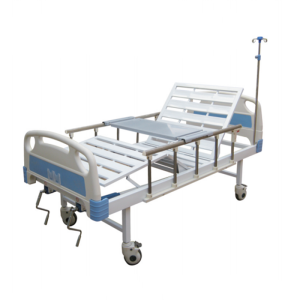
- Emergency hand crank: In the event of a power outage, a manual hand crank located at the foot of the bed can be used to adjust the bed’s position.
- Patient call button: Hospital bed remotes in clinical settings often have an additional button to call a nurse. This may be labeled with a symbol like a bell or a person.
Tips for use
- Go slow: Pressing the buttons too quickly or repeatedly can sometimes cause the controls to lag or freeze.
- Check the connections: If the remote isn’t working, ensure the power cord is plugged into the wall and the remote’s cord is securely connected to the bed.
- Know your model: Controls can vary slightly depending on the specific model of hospital bed. When possible, check with a caregiver or refer to the manufacturer’s instructions for the specific bed you are using.

